
English
·
简体中文
·
规格
·
官方网站
·
Discord
> [!IMPORTANT]
> **Reasonix 1.0 是用 Go 从零重写的版本** —— 本分支(`main-v2`)已是新的默认分支,后续开发都在这里。
> 早期的 `0.x` TypeScript 版本转为 **legacy**,保留在 [`v1`](https://github.com/esengine/DeepSeek-Reasonix/tree/v1) 分支(仅维护)。
> 详见**[迁移指南](./docs/MIGRATING.md)**。`npm i -g reasonix` 仍是安装命令——`1.0.0`+ 装的是 Go 二进制,`0.x` 是 legacy TS 版。(注意:1.0.0 尚未发到 npm,在此之前请从源码构建。)


面向终端的 DeepSeek 原生 AI coding agent。
由配置与插件驱动的极薄 harness——单一静态 Go 二进制,围绕 DeepSeek 的前缀缓存调优,长会话也能把 token 成本压低。
> [!IMPORTANT]
> **加入社区 · Community** — 双语 Discord,提供安装答疑(`#help` / `#求助`)、工作流展示与功能想法。→ ****
## 特性
- **配置驱动**:provider、agent、启用的工具、插件全部在 `reasonix.toml` 中声明,
内核无硬编码模型。
- **多模型 · 可组合**:DeepSeek(flash/pro)与 MiMo 作为预设内置;任何 OpenAI 兼容
端点都只是一条配置。可选让两个模型协同(执行器 + 规划器),各自独立、缓存稳定的 session。
- **插件驱动**:外部工具以子进程形式运行,通过 stdio JSON-RPC 通信(MCP 兼容);
内置工具在编译期自注册。
- **零摩擦分发**:`CGO_ENABLED=0` 单二进制;一条命令交叉编译到六个目标平台。
唯一依赖是一个 TOML 解析库。
## 安装 / 构建
```sh
make build # -> bin/reasonix
make cross # -> dist/(darwin|linux|windows × amd64|arm64)
```
## 快速开始
```sh
reasonix setup # 配置向导 → ./reasonix.toml
export DEEPSEEK_API_KEY=sk-... # 或写入 .env(见 .env.example)
reasonix chat # 然后在会话里运行 /init 生成 AGENTS.md(项目记忆)
reasonix run "把 main.go 里的 TODO 实现掉"
reasonix run --model mimo-pro "给这个函数补单元测试"
echo "解释这段代码" | reasonix run
```
## 配置
优先级:**flag > `./reasonix.toml` > `~/.config/reasonix/config.toml` > 内置默认值**。
密钥经环境变量通过 `api_key_env` 注入,绝不写入配置文件。
```toml
default_model = "deepseek-flash" # 执行器;设 [agent].planner_model 可加规划器
# language = "zh" # 界面语言;为空则按 $LANG / $REASONIX_LANG 自动检测
[agent]
# planner_model = "mimo-pro" # 可选的低频规划器
# subagent_model = "deepseek-pro" # runAs=subagent skill 的默认模型
# subagent_models = { review = "deepseek-pro", security_review = "deepseek-pro" }
[[providers]]
name = "deepseek-flash"
kind = "openai"
base_url = "https://api.deepseek.com"
model = "deepseek-v4-flash"
api_key_env = "DEEPSEEK_API_KEY"
# 还有预设:deepseek-pro、mimo-pro(mimo-v2.5-pro)、mimo-flash(mimo-v2-flash) @ api.xiaomimimo.com/v1
[tools]
enabled = [] # 省略/为空 = 全部内置工具
[permissions]
mode = "ask" # 无规则命中时 writer 的兜底:ask|allow|deny
deny = ["bash(rm -rf*)", "bash(git push*)"] # 任何模式下都硬阻断
allow = ["bash(go test*)"] # 从不询问
[sandbox]
# workspace_root = "" # 文件写工具被限制在此目录;留空 = 当前目录
# allow_write = ["/tmp"] # write_file/edit_file/multi_edit 额外可写的目录
[[plugins]]
name = "example"
command = "reasonix-plugin-example"
```
权限逐次调用把关:`deny` > `ask` > `allow` > 兜底(只读工具永远 allow,writer 落到
`mode`)。`reasonix chat` 会在 writer 调用前征求同意(`y` 本次 · `a` 本会话 · `n` 拒绝);
`reasonix run` 保持自主运行但仍然遵守 `deny`。完整 schema 与契约见
[`docs/SPEC.md`](docs/SPEC.md)。
权限是**策略**(哪些调用放行/询问),**沙盒**是**强制**:文件写工具
(`write_file` / `edit_file` / `multi_edit`)拒绝 `[sandbox] workspace_root`
之外的任何路径(默认当前目录,编辑不出项目),并解析符号链接与 `..`,使链接无法
打洞越界。读不受限。`bash` 本身在 macOS 默认进沙盒(`[sandbox] bash`,Seatbelt):
命令只能写这些 root(外加临时目录与工具链缓存),`[sandbox] network` 为真时才能联网;
其它平台暂回退为不沙盒运行(越界问一次与 Linux 支持见 `docs/SPEC.md` §9)。
### 插件(MCP)
Reasonix 是一个 MCP 客户端。`[[plugins]]` 的 `type` 选择传输:`stdio`(默认)启动本地子进
程(`command`/`args`/`env`);`http`(Streamable HTTP)连接远程 `url`,可带静态
`headers`(`${VAR}` / `${VAR:-default}` 从环境展开,密钥不入文件)。工具以
`mcp____` 暴露给模型,与 Claude Code 一致;声明 MCP `readOnlyHint: true`
的工具会参与并行调度并命中权限层的只读默认放行。
服务器的 **prompts** 会暴露成 `/mcp____` 斜杠命令(命令后空格分隔参
数);**resources** 通过在消息里写 `@:` 拉入;`/mcp` 列出已连接服务器及
各自暴露的内容。`make build` 还会产出 `bin/reasonix-plugin-example`——一个可直接运行的
stdio 参考实现(`echo`、`wordcount`、一个 `review` prompt、一个 style-guide 资源),
可照抄。
```toml
[[plugins]] # 本地 stdio 服务器
name = "example"
command = "reasonix-plugin-example"
[[plugins]] # 远程 Streamable HTTP 服务器
name = "stripe"
type = "http"
url = "https://mcp.stripe.com"
headers = { Authorization = "Bearer ${STRIPE_KEY}" }
```
**已有 Claude Code 的 `.mcp.json`?** 直接放到项目根目录,Reasonix 会原样读取——其
`mcpServers` 规范(`command`/`args`/`env`、`type`/`url`/`headers`、`${VAR}` 展开)
与 `[[plugins]]` 字段一一对应。两处来源会合并加载;同名时以 `reasonix.toml` 为准。
```json
{
"mcpServers": {
"filesystem": { "command": "npx", "args": ["-y", "@modelcontextprotocol/server-filesystem", "/path"] },
"stripe": { "type": "http", "url": "https://mcp.stripe.com", "headers": { "Authorization": "Bearer ${STRIPE_KEY}" } }
}
}
```
### 斜杠命令
`reasonix chat` 里,内置命令(`/compact`、`/new`、`/rewind`、`/tree`、`/branch`、`/switch`、`/todo`、`/model`、`/mcp`、`/help`)在本地执行。
`/tree` 查看已保存的对话分支,`/branch [name]` 从当前对话末端分支,`/branch [name]`
从较早的 checkpoint 轮次分支,`/switch ` 切换到另一个分支。**自定义命令**
是放在 `.reasonix/commands/`(项目)或 `~/.config/reasonix/commands/`(用户)下的 Markdown 文件——
`review.md` 即 `/review`,子目录构成命名空间(`git/commit.md` → `/git:commit`)。文件正文
是 prompt 模板,调用即作为一轮对话发出。
```markdown
---
description: Review the staged diff
argument-hint: [focus-area]
---
Review the staged diff. Focus on $ARGUMENTS, list bugs with file:line.
```
`$ARGUMENTS` 展开为全部空格分隔参数,`$1`…`$N` 为位置参数。MCP prompts 也以
`/mcp____` 形式出现在这里。
### @ 引用
在消息里写 `@` 引用,Reasonix 会在发送前解析成带标签的上下文块:`@path/to/file`(或
`@dir`)注入本地文件内容(或目录清单),`@:` 注入 MCP 资源。本地路径**只有
真实存在**时才当作引用,普通 `@mention` 保持原文。敲 `/` 或 `@` 会弹出补全菜单——斜杠
命令,或**逐层**的文件导航(一次只列当前一层目录、可下钻进子目录)外加 MCP 资源。
### 双模型协同(可选)
`reasonix setup` 刻意保持首次体验极简:选 provider → 输入 key(所选 provider 的所有
SKU 都会启用)。若要让两个模型协同(执行器 + 规划器,各自独立、缓存稳定的
session),向导后手动在 `reasonix.toml` 加一行即可:
```toml
[agent]
planner_model = "deepseek-pro" # 作为低频规划器
```
Subagent skills 默认继承执行器模型。设置 `subagent_model` 可让它们统一走另一个已配置
模型;设置 `subagent_models` 则只覆盖 `review`、`security_review` 等指定 skill。
## 架构
三层可扩展性,全部藏在内核按名解析的 registry 之后:
1. **Registry**:`Provider` 与 `Tool` 是接口;内核没有 `switch model`。
2. **编译期内置**:provider(`provider/openai`)和 tool(`tool/builtin`)通过
`init()` 自注册,`main` 用 blank import 拉入。新增内置 = 一个文件 + 一行 import。
3. **运行时插件**:配置里声明的可执行文件,通过 stdin/stdout 上的
newline-delimited JSON-RPC 2.0(MCP stdio 约定)通信,每个远程 tool 适配成
`Tool` 接口。
## 状态
已完成:基于 registry 的 provider/tool、OpenAI 兼容流式 + 工具调用(429/5xx 有界重
试)、九个内置工具(read_file、write_file、edit_file、multi_edit、bash、ls、glob、
grep、web_fetch)、TOML 配置、交互式 `reasonix setup` 向导、双模型协同(执行器 + 规划器,
各自独立、缓存稳定的 session)、低频上下文压缩、子 agent(`task`)、bubbletea 聊天
TUI(markdown、plan mode、上下文仪表盘、`/compact` `/new` `/tree` `/branch` `/switch`)、会话持久化 + 恢复、
逐次调用**权限**(allow/ask/deny 规则;chat 在 writer 前询问,deny 在各模式硬阻断)、
**工作区沙盒**(把文件写工具限制在项目内,符号链接/`..` 安全)、
MCP 客户端——**stdio + Streamable HTTP** 传输、工具(`mcp__server__tool`,支持
`readOnlyHint`)、prompts(斜杠命令)、resources(`@` 引用)、`/mcp`,可经
`[[plugins]]` 或 Claude 风格的项目 `.mcp.json` 配置——自定义斜杠命令
(`.reasonix/commands/*.md`)、`@file` / `@resource` 引用、外加可运行的参考插件
(`cmd/reasonix-plugin-example`)、harness 主循环、CLI。chat 在终端普通缓冲区运行(原生
scrollback)并带 `/` 与 `@` 输入补全。后续:给 `bash` 套 OS 级沙盒(macOS Seatbelt /
Linux bubblewrap,"盒子里放行、边界上询问")、Anthropic 原生 provider、MCP OAuth +
legacy SSE。见 `docs/SPEC.md` §9。
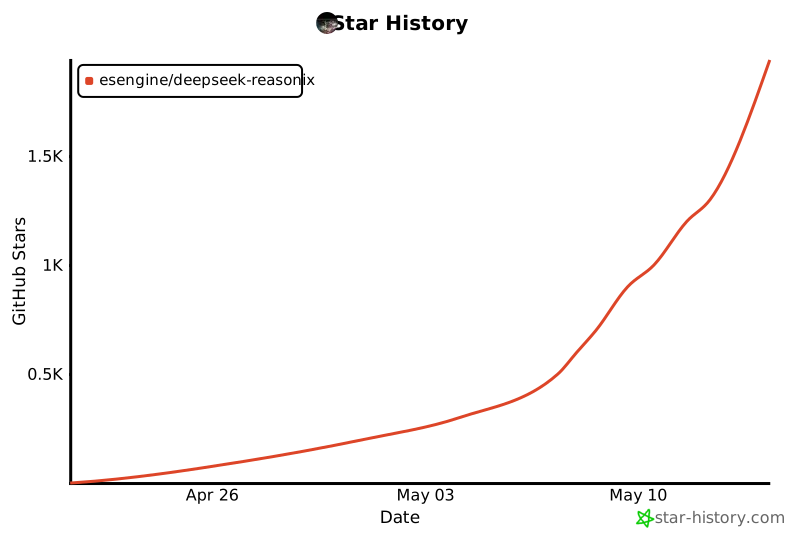
## Star 趋势
## 支持本项目
如果 Reasonix 帮你省了时间或 token,欢迎请杯咖啡。捐助不会换来 feature 优先级,也不会影响 issue 的处理顺序——就是「谢谢」。
- **国内** — 微信支付(扫下方二维码)
- **海外** — PayPal: [paypal.me/yuhuahui](https://paypal.me/yuhuahui)

## 致谢
下面这些朋友的工作塑造了 Reasonix 今天的样子 —— 综合 commit 数和代码量两个维度。
**按字母顺序排列,排名不分先后。** 完整贡献者列表在
[GitHub](https://github.com/esengine/DeepSeek-Reasonix/graphs/contributors)。
- [**ctharvey**](https://github.com/ctharvey)
- [**dimasd-angga**](https://github.com/dimasd-angga)(Dimas D. Angga)
- [**Evan-Pycraft**](https://github.com/Evan-Pycraft)
- [**ForeverYoungPp**](https://github.com/ForeverYoungPp)
- [**GTC2080**](https://github.com/GTC2080)(TaoMu)
- [**kabaka9527**](https://github.com/kabaka9527)
- [**lisniuse**](https://github.com/lisniuse)(Richie)
- [**wade19990814-hue**](https://github.com/wade19990814-hue)
- [**wviana**](https://github.com/wviana)(Wesley Viana)
另外特别感谢 [**Bernardxu123**](https://github.com/Bernardxu123) 设计的项目 logo,
以及 [AIGC Link](https://xhslink.com/m/80ngts127cA) 在小红书上的推广。

---
MIT —— 见 LICENSE
由 esengine/DeepSeek-Reasonix 社区共建